Bad News, DBAs, We Are All Developers Now
I sometimes joke that I’m a Junior Developer and a Principal Database Administrator, which is why I have a Staff level title. I’m not sure …
Read MoreSQL Server 2025 introduces a new Resource Governor capability to manage tempdb usage, along with making Resource Governor available in Standard Edition.
I wondered: can Resource Governor’s new tempdb feature help contain queries that don’t use temporary tables, but which spill massive amounts of data to tempdb? The docs say yes, but I always like to get hands-on experience when I can.
I’ve got an awful query that spills like a soft-serve machine choosing violence. Let’s test drive the new tempdb governance features in SQL Server 2025.

I’m using the StackOverflow2013 database with a query built to spill. The query gets a 15 GB memory grant due to the combination of window functions calculating aggregates across large partitions and multiple LEFT JOINs producing duplicate rows for windowing calculations.
That 15 GB memory grant is far too little for the amount of data going into a sort operator in the query plan, and the memory spill to disk easily fills up my 1 TB of local free space on my laptop if it’s not contained.
First, this script configures database settings and indexes used by the query:
USE StackOverflow2013;
GO

ALTER DATABASE CURRENT SET COMPATIBILITY_LEVEL = 170;
GO

EXECUTE dbo.DropIndexes;
GO

CREATE NONCLUSTERED INDEX
    ix_Posts_PostTypeId_ETC
ON dbo.Posts
([PostTypeId])
INCLUDE ([AcceptedAnswerId],[AnswerCount],[CommentCount],[CreationDate],[LastActivityDate],[OwnerUserId],[Score],[Tags],[Title],[ViewCount])
WITH
(
    DATA_COMPRESSION = PAGE
);
GO

CREATE NONCLUSTERED INDEX
    ix_Comments_PostId
ON dbo.Comments
    (PostId)
INCLUDE
(
    CreationDate,
    Score
)
WITH
(
    DATA_COMPRESSION = PAGE
);
GO
And this script is the spilling query itself:
/* This query is not good for much except tempdb spills. */
USE StackOverflow2013;
GO

SELECT TOP (100)
    QuestionId = q.Id,
    QuestionTitle = q.Title,
    QuestionCreationDate = q.CreationDate,
    QuestionScore = q.Score,
    QuestionViews = q.ViewCount,
    QuestionAnswerCount = q.AnswerCount,
    QuestionCommentCount = q.CommentCount,
    QuestionTags = q.Tags,
    QuestionLastActivityDate = q.LastActivityDate,
    QuestionOwnerId = uq.Id,
    QuestionOwnerName = uq.DisplayName,
    QuestionOwnerReputation = uq.Reputation,
    QuestionOwnerLocation = uq.Location,
    QuestionOwnerCreationDate = uq.CreationDate,
    AcceptedAnswerId = a.Id,
    AcceptedAnswerScore = a.Score,
    AcceptedAnswerCreationDate = a.CreationDate,
    AcceptedAnswerOwnerId = ua.Id,
    AcceptedAnswerOwnerName = ua.DisplayName,
    AcceptedAnswerOwnerReputation = ua.Reputation,
    TotalUpVotes =
        SUM
        (
            CASE
                WHEN v.VoteTypeId = 2
                THEN 1
                ELSE 0
            END
        ) OVER
        (
            PARTITION BY
                q.Id
        ),
    TotalFavorites =
        SUM
        (
            CASE
                WHEN v.VoteTypeId = 5
                THEN 1
                ELSE 0
            END
        ) OVER
        (
            PARTITION BY
                q.Id
        ),
    RecentCommentCount =
        COUNT_BIG
        (
            CASE
                WHEN c.CreationDate >= '2012-01-01'
                THEN 1
            END
        ) OVER
        (
            PARTITION BY
                q.Id
        ),
    QuestionOwnerBadgeCount =
        COUNT_BIG(b.Id) OVER
        (
            PARTITION BY
                uq.Id
        ),
    QuestionOwnerGoldBadges =
        SUM
        (
            CASE
                WHEN b.Name IN ('Legendary', 'Enlightened', 'Great Answer')
                THEN 1
                ELSE 0
            END
        ) OVER
        (
            PARTITION BY
                uq.Id
        )
FROM dbo.Posts AS q
JOIN dbo.Users AS uq
  ON uq.Id = q.OwnerUserId
LEFT JOIN dbo.Posts AS a
  ON a.Id = q.AcceptedAnswerId
LEFT JOIN dbo.Users AS ua
  ON ua.Id = a.OwnerUserId
LEFT JOIN dbo.Votes AS v
  ON v.PostId = q.Id
LEFT JOIN dbo.Comments AS c
  ON c.PostId = q.Id
LEFT JOIN dbo.Badges AS b
  ON b.UserId = uq.Id
WHERE q.PostTypeId = 1
AND   CASE
          WHEN uq.Reputation >= 50000
          AND  q.Score >= 10
          THEN 1
          WHEN uq.Reputation BETWEEN 5000 AND 49999
          AND  q.Score >= 20
          AND  q.ViewCount >= 5000
          THEN 1
          WHEN uq.Reputation < 5000
          AND  (
                   q.Score >= 40
                   OR (a.Score IS NOT NULL AND a.Score >= 15)
               )
          THEN 1
          WHEN ua.Reputation >= 20000
          AND  v.VoteTypeId = 2
          AND  c.CreationDate >= '2012-01-01'
          THEN 1
          ELSE 0
      END = 1
ORDER BY
    q.Score DESC,
    q.ViewCount DESC,
    q.CreationDate DESC;
SQL Server 2025 introduces Resource Governor tempdb Space Governance, which allows you to set limits in one of two ways.
To constrain tempdb usage there are two “group” level options as described in Create Workload Group:
GROUP_MAX_TEMPDB_DATA_MB: “the maximum amount of space that a workload group can consume in the tempdb data files, in megabytes… The limit is for the total space consumed in tempdb by all sessions in a workload group.”
GROUP_MAX_TEMPDB_DATA_PERCENT: “Specifies the maximum amount of space that a workload group can consume in the tempdb data files, in percent of the maximum tempdb size.” There’s a table in the docs that gets into the configuration requirements for this setting to be in effect. One requirement is that this doesn’t work if you also have GROUP_MAX_TEMPDB_DATA_MB configured for the workload group.
When a query exceeds the configured limit, SQL Server aborts it with error 1138, severity 17, Could not allocate a new page for database 'tempdb' because that would exceed the limit set for workload group 'workload-group-name'.
To test tempdb governance with our spilling query, we will:
sys.dm_resource_governor_workload_groupsUSE master;
GO
CREATE RESOURCE POOL tempdb_spill_test_pool;
GOA resource pool defines the physical resources available to the group of queries that you classify to use the pool. The resource pool lets you set things like CPU percentage limits with MAX_CPU_PERCENT and memory limits with MAX_MEMORY_PERCENT.
The tempdb governance feature does not have any options on the resource pool itself, the options are all on the workload group. You can use the default pool if you want, but I think it’s useful to create separate pools for different workloads for tracking, and you may wish to apply pool limits at some time in the future.
I’m creating a basic pool without specifying resource limits.
CREATE WORKLOAD GROUP tempdb_spill_test_group
WITH
(
    GROUP_MAX_TEMPDB_DATA_MB = 10240
)
USING tempdb_spill_test_pool;
GO
The USING clause assigns this workload group to our resource pool. Sessions classified into this workload group get the tempdb GROUP_MAX_TEMPDB_DATA_MB limit (10 GB) and any other resource limits we put on the pool.
Some workload group options allow you to define policies for the whole group, such as GROUP_MAX_REQUESTS. Some options define policies for individual requests within the group. For example, REQUEST_MAX_MEMORY_GRANT_PERCENT and REQUEST_MAX_CPU_TIME_SEC each allow you to limit the resources for individual queries that run in the pool. You can also set the MAX_DOP (maximum degree of parallelism) for all requests in the pool.
USE master;
GO

CREATE OR ALTER FUNCTION
    dbo.tempdb_test_classifier()
RETURNS sysname
WITH SCHEMABINDING
AS
BEGIN
    DECLARE
        @workload_group_name sysname = N'default';

    IF APP_NAME() = N'tempdb_spill_test'
    BEGIN
        SELECT
            @workload_group_name = N'tempdb_spill_test_group';
    END;

    RETURN @workload_group_name;
END;
GO
A classifier function is a scalar user-defined function that runs for every new connection. It returns the name of the workload group to assign the session to. The function must be created in the master database with SCHEMABINDING.
Only one classifier function can be active on a given SQL Server Instance at a time.
Classifier functions commonly use session properties like APP_NAME(), SUSER_SNAME() (login name), HOST_NAME() (client computer name), or custom logic to route sessions. The function executes during login, so keep it lightweight and fast to avoid impacting performance at login time and to avoid connection timeouts.
This also means that when you enable Resource Governor, sessions that are already connected will not use the pools or workload groups you’ve newly configured. Sessions are only classified the next time they log in.
The classifier function I’m using here checks the application name, because that’s very simple to use for testing.
ALTER RESOURCE GOVERNOR
WITH
(
    CLASSIFIER_FUNCTION = dbo.tempdb_test_classifier
);
GO

ALTER RESOURCE GOVERNOR RECONFIGURE;
GOSELECT
group_name = wg.name,
wg.group_max_tempdb_data_mb,
wg.group_max_tempdb_data_percent,
pool_name = rp.name
FROM sys.resource_governor_workload_groups AS wg
JOIN sys.dm_resource_governor_resource_pools AS rp
ON rp.pool_id = wg.pool_id
WHERE wg.name = N'tempdb_spill_test_group';
GOThe query results show that our workload group is configured with the 10 GB limit for tempdb data, and that the group is assigned to the resource pool we created as well.

To run the test query under resource governance, open a new query window in SSMS and set the application name in the connection properties. If you’re using SQL Server Management Studio 22, here are the steps in the new database connection window:
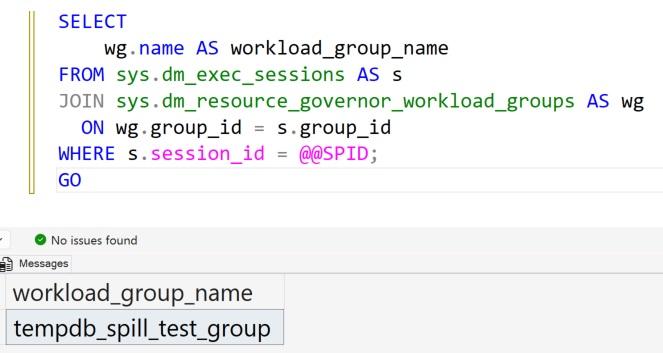
tempdb_spill_testRun this query in your new session to verify that it has been classified correctly:
SELECT
    workload_group_name = wg.name
FROM sys.dm_exec_sessions AS s
JOIN sys.dm_resource_governor_workload_groups AS wg
  ON wg.group_id = s.group_id
WHERE s.session_id = @@SPID;
GO
This should return tempdb_spill_test_group as the workload group name.
Now run the test query above in this session.
The spilling query hits the 10 GB limit on my laptop in around 17 seconds.
When it hits the limit, SQL Server aborts the query and I see the foretold error:
Msg 1138, Level 17, State 1, Line 3
Could not allocate a new page for database 'tempdb' because that would exceed
the limit set for workload group 'tempdb_spill_test_group', group_id 256.sys.dm_resource_governor_workload_groupsSince the query fails quickly, it’s easy to run it multiple times and watch the workload group’s tempdb usage while it is running:
SELECT
    wg.group_id,
    wg.name,
    wg.tempdb_data_space_kb,
    wg.peak_tempdb_data_space_kb,
    wg.total_tempdb_data_limit_violation_count
FROM sys.dm_resource_governor_workload_groups AS wg
WHERE wg.name = N'tempdb_spill_test_group';
GO
Here’s an example of what the output looks like on my laptop:
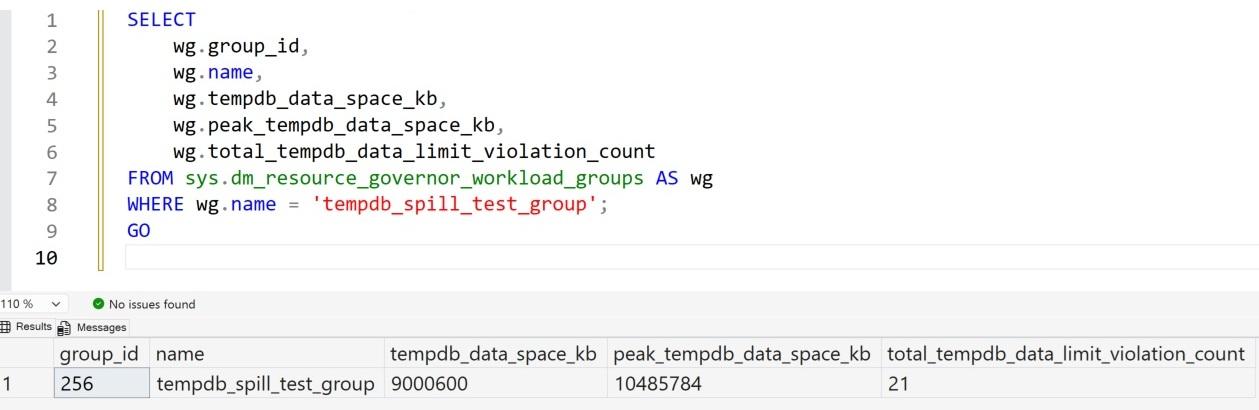
This column in sys.dm_resource_governor_workload_groups is defined as:
The number of times a request was aborted with error 1138 because it would exceed the limit on tempdb data space consumption for the workload group.
In some brief testing, I usually see this number increases by 8 on my laptop every time my query hits the limit and is aborted. The query is running at max degree of parallelism 8 on my laptop. Sometimes I see it increment by a different amount, though, such as 5.
Was the effective maxdop lowered for tha run for some reason? I’m not sure, I haven’t looked into it that much, but the increment is definitely not the count of individual query runs that failed.
This script undoes what the demo above sets up. You need to close all active sessions that are using the workload group/ resource pool before this will complete successfully.
ALTER RESOURCE GOVERNOR DISABLE;
GO

ALTER RESOURCE GOVERNOR
WITH
(
    CLASSIFIER_FUNCTION = NULL
);
GO

ALTER RESOURCE GOVERNOR RECONFIGURE;
GO

DROP FUNCTION IF EXISTS dbo.tempdb_test_classifier;
GO

DROP WORKLOAD GROUP tempdb_spill_test_group;
GO

DROP RESOURCE POOL tempdb_spill_test_pool;
GO✅ Yes, this Resource Governor feature protected my hard drive from the mad space consumption of this truly terrible query. This confirms what the documentation says: the tempdb space governance feature does not just apply to temp table usage, it also helps contain memory spills in query plan operators.
My takeaways:
This is a great feature to have in SQL Server, particularly if you have large amounts of data and queries can’t always be tested with production dataset sizes before getting released into your SQL Server. If you have auto-generated code or folks who need to rapidly develop queries for analytics, you’re probably pretty excited to get your hands on this feature.
This tempdb governance feature doesn’t provide warnings or controlled degradation. It’s a hard limit: stay under it or queries will fail. This makes it useful for protecting the server, but it means you need to tune your queries or increase memory grants to avoid hitting the limit.
The total_tempdb_data_limit_violation_count column in sys.dm_resource_governor_workload_groups is confusing. The docs read like it counts individual queries that fail, when in fact it seems to count something more like threads that fail when they hit the limit. This doesn’t seem like a huge problem as long as you don’t misinterpret it.
Overall, I think this feature is a welcome addition to Resource Governor, and it’s terrific that Resource Governor is available for Standard Edition in SQL Server 2025.


Copyright (c) 2025, Catalyze SQL, LLC; all rights reserved. Opinions expressed on this site are solely those of Kendra Little of Catalyze SQL, LLC. Content policy: Short excerpts of blog posts (3 sentences) may be republished, but longer excerpts and artwork cannot be shared without explicit permission.