
Bad News, DBAs, We Are All Developers Now
I sometimes joke that I’m a Junior Developer and a Principal Database Administrator, which is why I have a Staff level title. I’m not sure …
Read MoreI see this pattern repeatedly: a “wide” query that returns many columns and less than 100k rows runs slowly. SQL Server gets slow when it drags large amounts of baggage through the entire query plan, like a solo traveler struggling with massive suitcases in an airport instead of picking them up close to their destination.
SQL Server often minimizes data access by grabbing all the columns it needs early in query execution, then doing joins and filters. This means presentation columns get picked up early.
This pattern of picking up data baggage early and dragging it through the plan is also one of the reasons that SQL Server loves memory like:
The problem: Presentation columns you don’t need for filtering or sorting flow through expensive operations like sorts and hash joins. This frequently causes large memory grants, tempdb spills, and slow queries. Sometimes this is fine. Particularly for wide queries, it often isn’t.
The solution: Separate the core data needed for filtering and sorting from the presentation columns. Two patterns work well when you need to handle a lot of “baggage” in a SQL Server query:
Temp tables: Filter and sort with just the key columns, store your resulting core dataset in a temp table, then join back to get presentation columns. Best for complex logic and when you need statistics on an intermediate object.
Derived tables: Use a nested derived table structure to keep the narrow dataset separate until the final join. If your query uses TOP, push that into the derived table.
If the query needs to sort data (maybe for a merge join or an ORDER BY clause) or use hash joins for larger datasets, SQL Server must allocate memory to handle the data. And here’s the thing: it allocates memory for ALL the columns it has, not just the keys needed for sorting or joining.
It can’t just leave the presentation columns behind– it has to keep the data together as it flows through the plan.
So the more columns you’re pulling back in your SELECT list, the heavier and slower these operations tend to get. SQL Server estimates memory grants based on the number of rows it expects to process and the width of all columns in those rows. Large memory grants “steal” memory from the buffer pool (it has to come from somewhere). Concurrent queries with large memory grants can lead to RESOURCE SEMAPHORE waits, which can cause other queries to queue before they even get started.
Spoiler, summary of results from below.
| Approach | Execution Time | Memory Grant | Max Used Memory | Best For |
|---|---|---|---|---|
| Original query | 13 seconds | 15 GB | 10.5 GB | Letting the query optimizer make its own choices. |
| Temp table | 3 seconds | 6.8 GB (first query), 6.5 MB (second query) | 776 MB (first query), 0 (second query) | Complex logic, need statistics, debugging |
| Derived table | 3 seconds | 7.8 GB | 784 MB | You want to keep everything in one query and aren’t concerned about needing statistics between the steps. |
Here is the compat level and indexes I’m using. This was run against SQL Server 2025 on my laptop.
USE StackOverflow2013;
GO

ALTER DATABASE CURRENT SET COMPATIBILITY_LEVEL = 170;
GO

EXECUTE dbo.DropIndexes;
GO

CREATE NONCLUSTERED INDEX
    ix_Posts_OwnerUserId_Score_PostTypeId
ON dbo.Posts
(
    OwnerUserId,
    PostTypeId,
    Score
)
WITH
(
    DATA_COMPRESSION = PAGE,
    SORT_IN_TEMPDB = ON
);
GO

CREATE NONCLUSTERED INDEX
    ix_Comments_UserId_Score
ON dbo.Comments
(
    UserId,
    Score
)
WITH
(
    DATA_COMPRESSION = PAGE,
    SORT_IN_TEMPDB = ON
);
GO

CREATE NONCLUSTERED INDEX
    ix_Comments_PostId
ON dbo.Comments
(
    PostId
)
WITH
(
    DATA_COMPRESSION = PAGE,
    SORT_IN_TEMPDB = ON
);
GOI’ve titled this query “StackOverflow Sick Burns and Top Pithyness.”
The query finds high-scoring comments, where:
The query takes 13 seconds on my laptop.
SELECT TOP 100
    /* Core columns used for filtering/sorting */
    userId = u.Id,
    commentScore = c.Score,
    questionScore = userHighestQuestion.questionScore,
    scoreDifference = c.Score - ISNULL(userHighestQuestion.questionScore, 0),

    /* Presentation-only: Comment details */
    commentId = c.Id,
    commentCreationDate = c.CreationDate,
    commentText = c.Text, /* large varchar - presentation only */

    /* Presentation-only: User details */
    userDisplayName = u.DisplayName,
    userReputation = u.Reputation,
    userLocation = u.Location,
    userCreationDate = u.CreationDate,
    userUpvotes = u.UpVotes,
    userDownvotes = u.DownVotes,
    userViews = u.Views,
    userAboutMe = u.AboutMe, /* LOB column - presentation only */

    /* Presentation-only: Post that comment is on */
    commentPostTitle = p.Title,
    commentPostBody = p.Body, /* LOB column - presentation only */
    commentPostViewCount = p.ViewCount,
    commentPostScore = p.Score,
    commentPostTags = p.Tags,
    commentPostOwnerDisplayName = up.DisplayName,
    commentPostOwnerReputation = up.Reputation,

    /* Presentation-only: User's highest question (if any) */
    questionId = q.Id,
    questionTitle = q.Title,
    questionCreationDate = q.CreationDate,
    questionViewCount = q.ViewCount,
    questionTags = q.Tags,
    questionBody = q.Body, /* LOB column - presentation only */

    /* Presentation-only: Calculated columns */
    daysSinceComment =
        DATEDIFF
        (
            DAY,
            c.CreationDate,
            GETDATE()
        ),
    userReputationCategory =
        CASE
            WHEN u.Reputation < 100
            THEN N'New User'
            WHEN u.Reputation < 1000
            THEN N'Regular User'
            WHEN u.Reputation < 10000
            THEN N'Established User'
            ELSE N'Expert User'
        END
FROM dbo.Comments AS c
JOIN dbo.Users AS u
  ON u.Id = c.UserId /* excludes comments with NULL UserId (deleted users) */
JOIN dbo.Posts AS p
  ON p.Id = c.PostId
JOIN dbo.Users AS up
  ON up.Id = p.OwnerUserId /* excludes comments on community wiki posts (NULL OwnerUserId) */
LEFT JOIN
(
    /* Get one question per user: highest score, highest Id as tie-breaker */
    SELECT
        userId = q.OwnerUserId,
        questionId = q.Id,
        questionScore = q.Score
    FROM dbo.Posts AS q
    WHERE q.PostTypeId = 1
    /* Find questions with the maximum score for this user, highest Id as tie-breaker */
    AND   q.Id =
    (
        SELECT
            MAX(qMaxScore.Id)
        FROM dbo.Posts AS qMaxScore
        WHERE qMaxScore.OwnerUserId = q.OwnerUserId
        AND   qMaxScore.PostTypeId = 1
        AND   qMaxScore.Score =
        (
            SELECT
                MAX(qUser.Score)
            FROM dbo.Posts AS qUser
            WHERE qUser.OwnerUserId = q.OwnerUserId
            AND   qUser.PostTypeId = 1
        )
    )
) AS userHighestQuestion
  ON userHighestQuestion.userId = c.UserId
LEFT JOIN dbo.Posts AS q
  ON q.Id = userHighestQuestion.questionId
WHERE
    CASE
        WHEN c.Score > 200
        AND  c.UserId <> p.OwnerUserId
        AND  (userHighestQuestion.questionScore IS NULL OR c.Score > userHighestQuestion.questionScore)
        THEN 1
        ELSE 0
    END = 1
ORDER BY
    c.Score DESC;
GO
Here is the overall shape of the actual query plan:

The plan does some interesting things, but one choice that goes badly is that it picks up presentation columns Body, Tags, Title, and more from Posts for the table aliased q. It then feeds all that data into a Filter operator.
This screenshot is from a different execution than the one in the plan shape above. In this execution the filter operator took even longer, but in both cases they output the same columns.
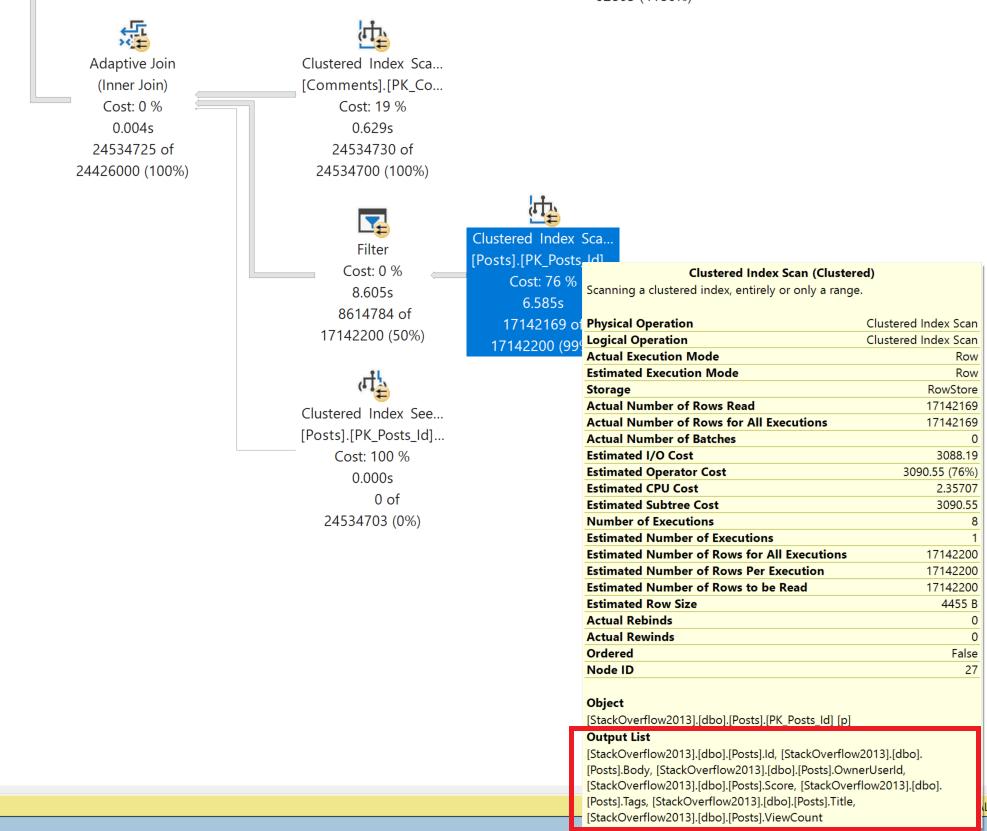
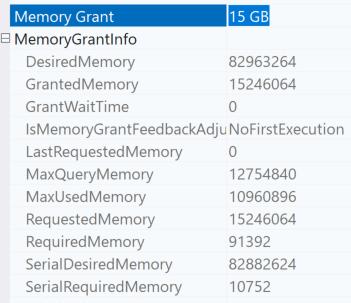
The Body column is the whole text of questions – that’s a lot of data. The query has a 15 GB memory grant, and it uses 10.5 GB of that.
Let’s break the query into two steps.
I am assuming I don’t need to order results in the second query and that ordering can be handled in the presentation layer, but ordering is required where we process TOP.
This returns in 3 seconds on my laptop. The memory grant for the query that populates the temp table is 6.8 GB (it used 776 MB) and 6.5 MB for the query that reads from the temp table and joins to get detail data (it used 0).
The main concept of this tuning approach is that we are specifying that we want to establish our “core” dataset and pop it into a temporary table before we fetch columns for presentation. SQL Server loves a temporary table because it can automatically create column statistics on it, which also can help it optimize the second query well.
DROP TABLE IF EXISTS #core;

SELECT TOP 100 p.Id as PostId, u.Id as UserId, c.Id as CommentId, q.Id as questionId, userHighestQuestion.questionScore, up.DisplayName, up.Reputation
INTO #core
FROM dbo.Comments AS c
JOIN dbo.Users AS u
    ON u.Id = c.UserId /* excludes comments with NULL UserId (deleted users) */
JOIN dbo.Posts AS p
    ON p.Id = c.PostId
JOIN dbo.Users AS up
ON up.Id = p.OwnerUserId /* excludes comments on community wiki posts (NULL OwnerUserId) */
LEFT JOIN
(
    /* Get one question per user: highest score, highest Id as tie-breaker */
    SELECT
        userId = q.OwnerUserId,
        questionId = q.Id,
        questionScore = q.Score
    FROM dbo.Posts AS q
    WHERE q.PostTypeId = 1
    /* Find questions with the maximum score for this user, highest Id as tie-breaker */
    AND   q.Id =
    (
        SELECT
            MAX(qMaxScore.Id)
        FROM dbo.Posts AS qMaxScore
        WHERE qMaxScore.OwnerUserId = q.OwnerUserId
        AND   qMaxScore.PostTypeId = 1
        AND   qMaxScore.Score =
        (
            SELECT
                MAX(qUser.Score)
            FROM dbo.Posts AS qUser
            WHERE qUser.OwnerUserId = q.OwnerUserId
            AND   qUser.PostTypeId = 1
        )
    )
) AS userHighestQuestion
    ON userHighestQuestion.userId = c.UserId
LEFT JOIN dbo.Posts AS q
    ON q.Id = userHighestQuestion.questionId
WHERE
    CASE
        WHEN c.Score > 200
        AND  c.UserId <> p.OwnerUserId
        AND  (userHighestQuestion.questionScore IS NULL OR c.Score > userHighestQuestion.questionScore)
        THEN 1
        ELSE 0
    END = 1
ORDER BY
    c.Score DESC;

SELECT
    /* Core columns used for filtering/sorting */
    userId = u.Id,
    commentScore = c.Score,
    questionScore = core.questionScore,
    scoreDifference = c.Score - ISNULL(core.questionScore, 0),

    /* Presentation-only: Comment details */
    commentId = c.Id,
    commentCreationDate = c.CreationDate,
    commentText = c.Text, /* large varchar - presentation only */

    /* Presentation-only: User details */
    userDisplayName = u.DisplayName,
    userReputation = u.Reputation,
    userLocation = u.Location,
    userCreationDate = u.CreationDate,
    userUpvotes = u.UpVotes,
    userDownvotes = u.DownVotes,
    userViews = u.Views,
    userAboutMe = u.AboutMe, /* LOB column - presentation only */

    /* Presentation-only: Post that comment is on */
    commentPostTitle = p.Title,
    commentPostBody = p.Body, /* LOB column - presentation only */
    commentPostViewCount = p.ViewCount,
    commentPostScore = p.Score,
    commentPostTags = p.Tags,
    commentPostOwnerDisplayName = core.DisplayName,
    commentPostOwnerReputation = core.Reputation,

    /* Presentation-only: User's highest question (if any) */
    questionId = q.Id,
    questionTitle = q.Title,
    questionCreationDate = q.CreationDate,
    questionViewCount = q.ViewCount,
    questionTags = q.Tags,
    questionBody = q.Body, /* LOB column - presentation only */

    /* Presentation-only: Calculated columns */
    daysSinceComment =
        DATEDIFF
        (
            DAY,
            c.CreationDate,
            GETDATE()
        ),
    userReputationCategory =
        CASE
            WHEN u.Reputation < 100
            THEN N'New User'
            WHEN u.Reputation < 1000
            THEN N'Regular User'
            WHEN u.Reputation < 10000
            THEN N'Established User'
            ELSE N'Expert User'
        END
FROM #core as core
JOIN dbo.Posts as p on core.PostId=p.Id
JOIN dbo.Comments as c on core.CommentId=c.Id
JOIN dbo.Users as u on core.UserId=u.Id
JOIN dbo.Posts as q on q.Id = core.questionId;
GO
When to use temp tables: Use this approach when you need column statistics for optimization, have complex multi-step logic that benefits from breaking into stages, or want to debug intermediate results. Temp tables also work well when you need to reuse the core dataset multiple times.
Do we really need the temp table though?
Let’s see how far we can get while staying in a single query. This tuning option focuses on defining the core dataset in derived tables or CROSS APPLYs, then joining back to get the wider presentation columns. In this example we’re using TOP, so we push that into a derived table and join to it. The same pattern can work for queries without TOP: use the derived table to separate the narrow filtering/sorting dataset from the presentation columns.
This query finishes on my laptop in 3 seconds. The memory grant is 7.8 GB, and it used 784 MB of that. If this was an actual production query I’d figure out how to tone that grant down a bit and tune this more. But for the purpose of a relatively quick post, this makes the general point.
When to use derived tables: Use this approach when you want a single query but can accept higher memory grants (or take the time to tune them away), or when the query runs infrequently enough that the memory grant isn’t a concern.
SELECT
    /* Core columns used for filtering/sorting */
    userId = u.Id,
    commentScore = c.Score,
    questionScore = core.questionScore,
    scoreDifference = c.Score - ISNULL(core.questionScore, 0),

    /* Presentation-only: Comment details */
    commentId = c.Id,
    commentCreationDate = c.CreationDate,
    commentText = c.Text, /* large varchar - presentation only */

    /* Presentation-only: User details */
    userDisplayName = u.DisplayName,
    userReputation = u.Reputation,
    userLocation = u.Location,
    userCreationDate = u.CreationDate,
    userUpvotes = u.UpVotes,
    userDownvotes = u.DownVotes,
    userViews = u.Views,
    userAboutMe = u.AboutMe, /* LOB column - presentation only */

    /* Presentation-only: Post that comment is on */
    commentPostTitle = p.Title,
    commentPostBody = p.Body, /* LOB column - presentation only */
    commentPostViewCount = p.ViewCount,
    commentPostScore = p.Score,
    commentPostTags = p.Tags,
    commentPostOwnerDisplayName = core.DisplayName,
    commentPostOwnerReputation = core.Reputation,

    /* Presentation-only: User's highest question (if any) */
    questionId = q.Id,
    questionTitle = q.Title,
    questionCreationDate = q.CreationDate,
    questionViewCount = q.ViewCount,
    questionTags = q.Tags,
    questionBody = q.Body, /* LOB column - presentation only */

    /* Presentation-only: Calculated columns */
    daysSinceComment =
        DATEDIFF
        (
            DAY,
            c.CreationDate,
            GETDATE()
        ),
    userReputationCategory =
        CASE
            WHEN u.Reputation < 100
            THEN N'New User'
            WHEN u.Reputation < 1000
            THEN N'Regular User'
            WHEN u.Reputation < 10000
            THEN N'Established User'
            ELSE N'Expert User'
        END
FROM
(
    SELECT TOP 100 p.Id as PostId, u.Id as UserId, c.Id as CommentId, q.Id as questionId, userHighestQuestion.questionScore, up.DisplayName, up.Reputation
    FROM dbo.Comments AS c
    JOIN dbo.Users AS u
      ON u.Id = c.UserId /* excludes comments with NULL UserId (deleted users) */
    JOIN dbo.Posts AS p
      ON p.Id = c.PostId
    JOIN dbo.Users AS up
      ON up.Id = p.OwnerUserId /* excludes comments on community wiki posts (NULL OwnerUserId) */
    LEFT JOIN
    (
        /* Get one question per user: highest score, highest Id as tie-breaker */
        SELECT
            userId = q.OwnerUserId,
            questionId = q.Id,
            questionScore = q.Score
        FROM dbo.Posts AS q
        WHERE q.PostTypeId = 1
        /* Find questions with the maximum score for this user, highest Id as tie-breaker */
        AND   q.Id =
        (
            SELECT
                MAX(qMaxScore.Id)
            FROM dbo.Posts AS qMaxScore
            WHERE qMaxScore.OwnerUserId = q.OwnerUserId
            AND   qMaxScore.PostTypeId = 1
            AND   qMaxScore.Score =
            (
                SELECT
                    MAX(qUser.Score)
                FROM dbo.Posts AS qUser
                WHERE qUser.OwnerUserId = q.OwnerUserId
                AND   qUser.PostTypeId = 1
            )
        )
    ) AS userHighestQuestion
      ON userHighestQuestion.userId = c.UserId
    LEFT JOIN dbo.Posts AS q
      ON q.Id = userHighestQuestion.questionId
    WHERE
        CASE
            WHEN c.Score > 200
            AND  c.UserId <> p.OwnerUserId
            AND  (userHighestQuestion.questionScore IS NULL OR c.Score > userHighestQuestion.questionScore)
            THEN 1
            ELSE 0
        END = 1
    ORDER BY
        c.Score DESC
 ) as core

JOIN dbo.Posts as p on core.PostId=p.Id
JOIN dbo.Comments as c on core.CommentId=c.Id
JOIN dbo.Users as u on core.UserId=u.Id
JOIN dbo.Posts as q on q.Id = core.questionId;
Here is the overall shape of the query plan:
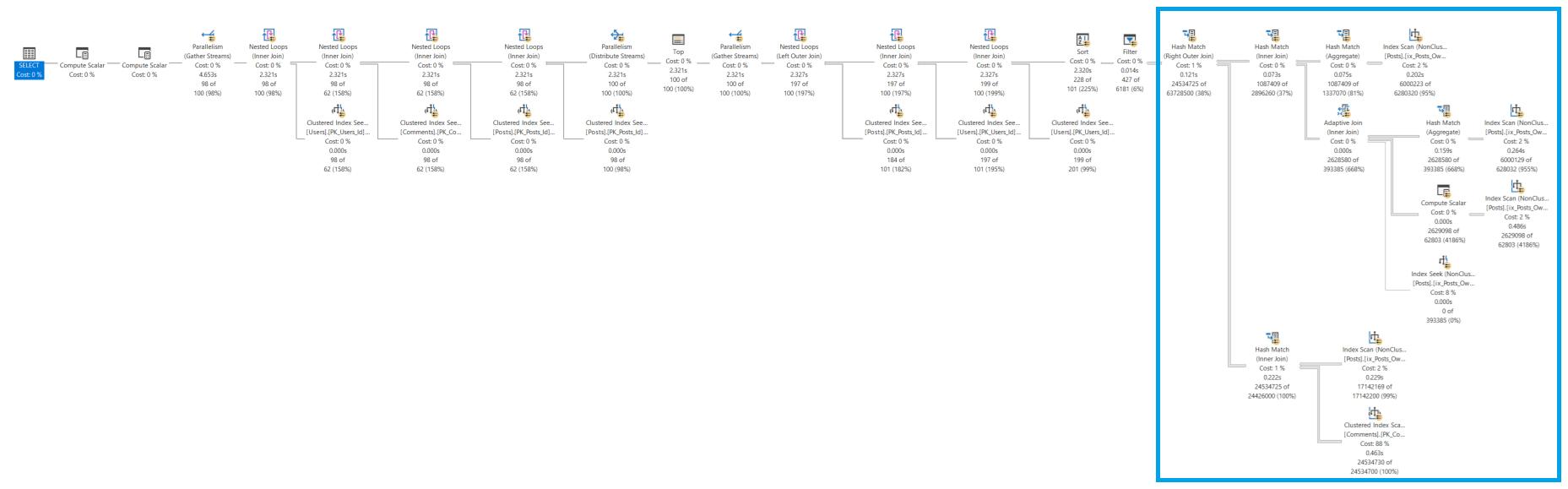
The use of the derived table forces SQL Server to push that portion of the query into the block to the right, then joins to the other tables are processed.
Do note that I wrote forces: similar to the temp table rewrite, we are making a choice that dictates how this will be processed. We are removing choices from the query optimizer.
When splitting queries to reduce baggage, watch out for these issues:
When SQL Server carries wide columns through expensive operations like sorts and hash joins, it requires significant memory and slows down your queries. By separating the core data you need for filtering and sorting from the presentation columns, you can significantly reduce the memory footprint and improve query performance.
The next time you see a slow query with a wide result set, check the execution plan. Look at operators like Sort or Hash Match and examine their “Output List” or “Defined Values” properties. If you see many more columns than are needed for the operation itself, you’ve found the baggage. Try one of these two approaches to lighten the load.
If the query runs very frequently, it’s worth considering your options for whether application caching might help out, too. As they say, the fastest query is the one you never run.



Copyright (c) 2025, Catalyze SQL, LLC; all rights reserved. Opinions expressed on this site are solely those of Kendra Little of Catalyze SQL, LLC. Content policy: Short excerpts of blog posts (3 sentences) may be republished, but longer excerpts and artwork cannot be shared without explicit permission.