Bad News, DBAs, We Are All Developers Now
I sometimes joke that I’m a Junior Developer and a Principal Database Administrator, which is why I have a Staff level title. I’m not sure …
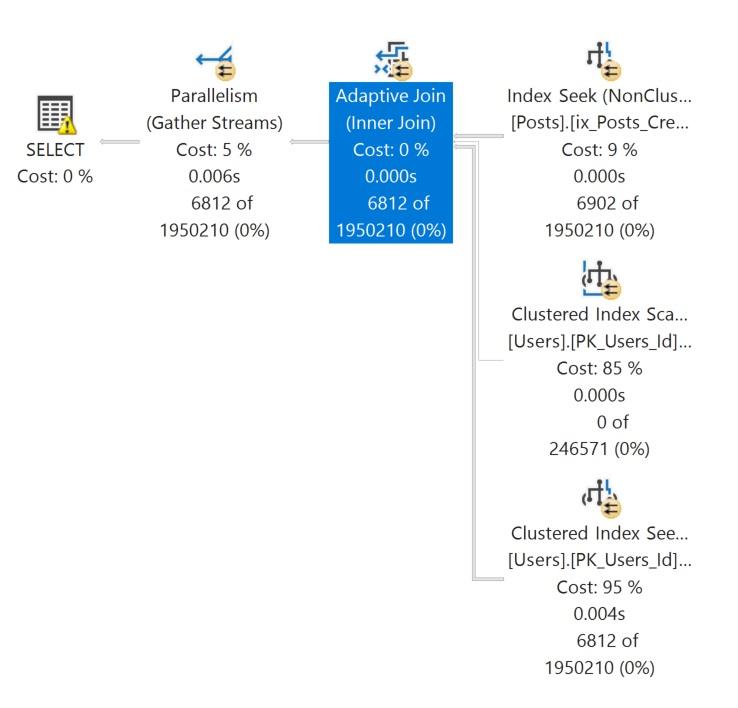
Read MoreAdaptive joins let the optimizer choose between a Hash Join and a Nested Loop join at runtime, which can be fantastic for performance when row count estimates are variable. Recently, when Erik Darling taught two days on TSQL at PASS Community Data Summit, a student asked why a query plan where an adaptive join used a Nested Loop at runtime ended up with a large memory grant anyway.
I didn’t remember the answer to this, but the great thing about co-teaching is that Erik did: adaptive joins always start executing as Hash Joins, which means they have to get memory grants upfront. Even if the query ultimately switches to a Nested Loop at runtime, that memory grant was already allocated. This has real implications for memory usage, especially in high-concurrency environments.
Adaptive joins were introduced in SQL Server 2017. This join allows the query optimizer to choose between a batch mode Hash Join and a row mode Nested Loops Join at runtime, based on the actual number of rows processed in the Hash Join build phase.
This is a departure from traditional query optimization, where the optimizer makes a one-time decision during plan compilation. With adaptive joins, the optimizer can “change its mind” during execution if the row counts it encounters indicate that a hash join isn’t needed and it can do something more lightweight for that execution of the query.
I’m going to stick to the basics in this post, but there are some excellent deep dives on how adaptive joins work listed at the end of this post.

Let’s talk about how Hash Joins work. Hash Joins have two phases: build and probe.
Imagine Erik and I are giving a training event. We hire a person to stand at the door and check people in. They know exactly who should be there, and they’re a lot tougher than they look.
Build phase: Before the event starts, we give the door person a list of all registered attendees. The information is in an Excel table (the world’s most popular database). In SQL Server terms, we have built a hash table in memory of all the people who are allowed in.
Probe phase: As people arrive, the door person checks each person’s name against the list– they probe the list to see if each person’s name has a matching value in the hash table. If your name is on the list, they let you through. If not, you’re turned away.
In a hash join, SQL Server does the same thing:
The build phase happens first and requires memory to store the hash table. The probe phase happens second and uses that hash table to quickly find matches / check who is “on the list.”
Key points to remember are:
As Paul White emphasizes in his article on the adaptive join threshold:
One thing I want you to bear in mind throughout this piece is that an adaptive join always starts executing as a batch mode hash join. This is true even if the execution plan indicates the adaptive join will transition to apply.
Even if the adaptive join ultimately switches to a row mode apply strategy (which is more efficient for small row counts), it still had to start as a hash join and request the memory grant upfront. The threshold calculation is based on cost estimates and the actual row count from the build phase.
This is where adaptive joins get interesting from a resource management perspective.
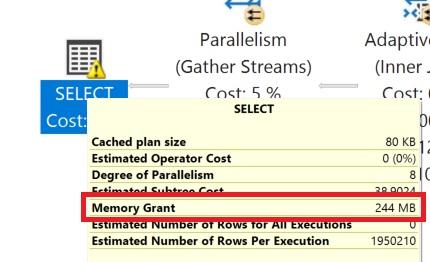
Every execution of a query with an adaptive join must request a memory grant for the hash join, even if the query ultimately switches to a row mode apply at runtime. This follows directly from Paul White’s point that adaptive joins always start executing as batch mode hash joins - the memory grant is requested before SQL Server knows whether it will need to switch strategies.
This means:
Because adaptive joins always request memory grants, sometimes it’s still worth optimizing queries using temp tables and dynamic SQL to:
This doesn’t mean you should avoid adaptive joins entirely - they’re a powerful feature that often improves performance. But understanding the memory grant implications helps you make informed decisions about query optimization strategies.
Here’s an example query using the StackOverflow2013 database that gets an Adaptive Join on my laptop instance running SQL Server 2025.
USE StackOverflow2013;
GO

ALTER DATABASE CURRENT SET COMPATIBILITY_LEVEL = 150;
GO

EXECUTE dbo.DropIndexes;
GO

CREATE NONCLUSTERED INDEX
    ix_Posts_CreationDate_Score
ON dbo.Posts
(
    CreationDate,
    Score
)
INCLUDE
(
    OwnerUserId,
    PostTypeId,
    CommentCount
)
WHERE PostTypeId IN (1, 2)
WITH
(
    DATA_COMPRESSION = PAGE,
    SORT_IN_TEMPDB = ON
);
GO

CREATE OR ALTER PROCEDURE
    dbo.Adaptive
(
    @Start datetime,
    @End datetime
)
AS
BEGIN
    SELECT
        u.DisplayName,
        u.Reputation,
        p.Score,
        p.CreationDate
    FROM dbo.Posts AS p
    JOIN dbo.Users AS u
        ON u.Id = p.OwnerUserId
    WHERE p.PostTypeId IN (1, 2)
    AND   p.CreationDate >= @Start
    AND   p.CreationDate < @End
END;
GO

/* This generates a plan with an adaptive join */
EXECUTE dbo.Adaptive '20130101', '20130514';
GO

/* This reuses the plan and chooses to use the nested loop strategy
on the adaptive join */
EXECUTE dbo.Adaptive '20130101', '20130102';
GO
The actual query plan for the second execution looks like this:
Memory grant information is not available in detail per operator, but you can see how much was granted for the query. In this case it is on the SELECT operator.
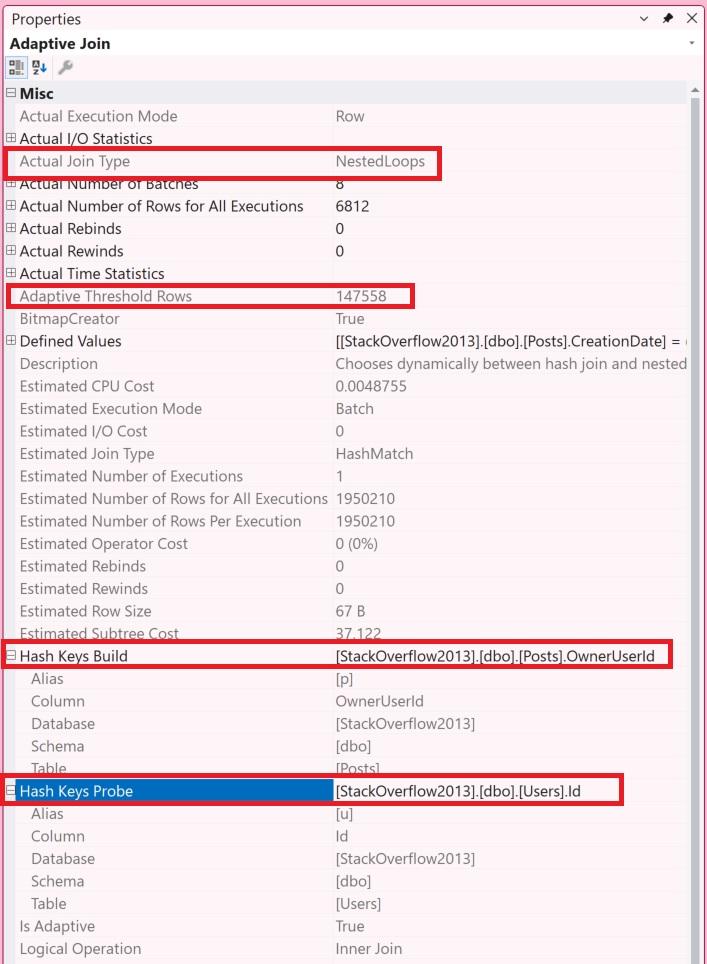
Detail on how much of the memory grant was used and what was involved in “negotiating” the request is visible in the properties pane for the operator or in the XML of the plan.
When you look at properties of an adaptive join operator, you’ll see:
| Property | Description |
|---|---|
| Actual Join Type | Whether it picked nested loops or a hash join |
| Adaptive Threshold Rows | The cardinality at which it switches between nested loops or a hash join |
| Hash Keys Build | The column(s) from the build input that are hashed into buckets to do the join |
| Hash Keys Probe | The columns(s) from the probe or nested loop (depending on what is selected) that are used to do the join |
Adaptive joins have some limitations:
CROSS APPLY with TOP or OUTER APPLY may not qualify. As Erik Darling notes in his detailed answer, there’s an Extended Event called adaptive_join_skipped that can help you track when and why adaptive joins are skipped, if you like rocket science.Adaptive joins are enabled by default when the requirements are met, but you can control them at the database or query level.
Database scoped configuration (affects all queries in the database):
ALTER DATABASE SCOPED CONFIGURATION SET DISABLE_BATCH_MODE_ADAPTIVE_JOINS = ON; (yes, ON means disable - it’s a double negative)ALTER DATABASE SCOPED CONFIGURATION SET DISABLE_BATCH_MODE_ADAPTIVE_JOINS = OFF;ALTER DATABASE SCOPED CONFIGURATION SET BATCH_MODE_ADAPTIVE_JOINS = OFF;ALTER DATABASE SCOPED CONFIGURATION SET BATCH_MODE_ADAPTIVE_JOINS = ON;Query hint (affects only the specific query):
OPTION (USE HINT('DISABLE_BATCH_MODE_ADAPTIVE_JOINS'));The query hint takes precedence over the database scoped configuration setting.
Adaptive joins are a powerful feature that can improve query performance by choosing the right join strategy at runtime.
However, they ain’t free: they come with memory grant implications that are important to understand, especially in high-concurrency environments or systems with limited memory.
The fact that adaptive joins always start as batch mode hash joins means they always request memory grants, even if they ultimately switch to row mode apply. These joins can be fantastic, but you probably don’t want them running all the time in a highly concurrent system.



Copyright (c) 2025, Catalyze SQL, LLC; all rights reserved. Opinions expressed on this site are solely those of Kendra Little of Catalyze SQL, LLC. Content policy: Short excerpts of blog posts (3 sentences) may be republished, but longer excerpts and artwork cannot be shared without explicit permission.